

Using a photo from the web
If you want try the tilt-shift effect on a photo online, simply find the direct image URL and copy &
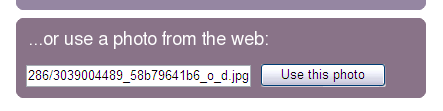
paste it into the "Use a photo from the web" form on the front page or photo editing page.
What is the direct image URL?
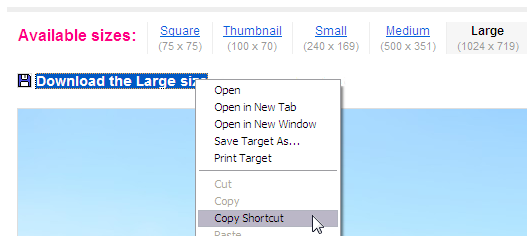
It's the web address that refers directly to the image itself. It may often appear as a link to "Download an image". For example, to use a photo from Flickr, go to the photo page, and click on the "All sizes" button.
You can then copy one of the download links and use that in TiltShiftMaker (use "Copy Shortcut" in Internet Explorer or "Copy Link Location" in Firefox).
Copying the image URL from a Google search -
When searching Google images, you will first need to click on an image thumbnail result. Once the larger image is displayed, you should be able to right-click on it and select an option like "Copy image URL" (in Google Chrome browser, see also "Copying other image URLs" below for ways to do this in other web browsers).
You should then be able to paste this image URL into the "Use a photo from the web" box on TiltShiftMaker.
Note: You need to click on and open the image thumbnail in Google results first, as copying the link of the thumbnail itself won't often work.
Copying the image URL from flickr -
Paste the link into TiltShiftMaker -
Copying other image URLs
For images from other web sites, if you are using Firefox, you should be able to right-click on the image and use "Copy image location" to get the direct image URL. If you're using Google Chrome, it's right-click and "Copy image URL" and for Safari and Opera it's right-click and "Copy image address".
If you're using Internet Explorer, you may have to first open the full size image in its own tab, and then copy and paste the image URL from the address bar at the top of the browser.
In each case, the link you copy & paste should end in ".jpg", ".jpeg" or ".png".
What is the direct image URL?
It's the web address that refers directly to the image itself. It may often appear as a link to "Download an image". For example, to use a photo from Flickr, go to the photo page, and click on the "All sizes" button.
You can then copy one of the download links and use that in TiltShiftMaker (use "Copy Shortcut" in Internet Explorer or "Copy Link Location" in Firefox).
Copying the image URL from a Google search -
When searching Google images, you will first need to click on an image thumbnail result. Once the larger image is displayed, you should be able to right-click on it and select an option like "Copy image URL" (in Google Chrome browser, see also "Copying other image URLs" below for ways to do this in other web browsers).
You should then be able to paste this image URL into the "Use a photo from the web" box on TiltShiftMaker.
Note: You need to click on and open the image thumbnail in Google results first, as copying the link of the thumbnail itself won't often work.
Copying the image URL from flickr -
Paste the link into TiltShiftMaker -
Copying other image URLs
For images from other web sites, if you are using Firefox, you should be able to right-click on the image and use "Copy image location" to get the direct image URL. If you're using Google Chrome, it's right-click and "Copy image URL" and for Safari and Opera it's right-click and "Copy image address".
If you're using Internet Explorer, you may have to first open the full size image in its own tab, and then copy and paste the image URL from the address bar at the top of the browser.
In each case, the link you copy & paste should end in ".jpg", ".jpeg" or ".png".